 BLOCKSMITH
Home · Gallery · Skins · Halloween · Purple spooky mask
Purple spooky mask
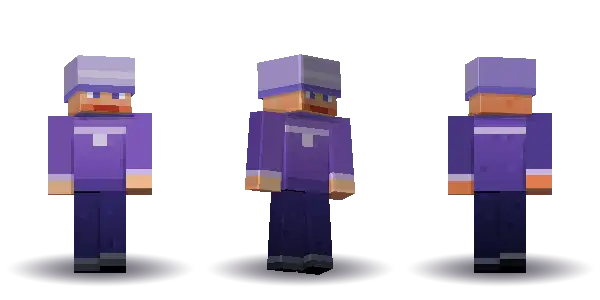
Purple spooky mask. A free Minecraft skin from “a purple spooky mask”, painted by Blocksmith as a 64×64 PNG for Java and Bedrock.
Drag to turn. Front and Back snap the view. Drawn from Blocksmith's own 64 by 64 skin, not a Mojang texture.
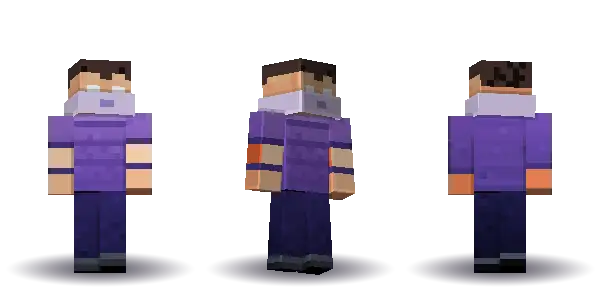
- Hair short
- Face happy
- Top tee
- Legs trousers
- Extra mask
Get this skin
The offline reader builds “a purple spooky mask” on your computer, so this one does not spend an AI wish. Players 13 and over sign in with a verified email. A new account includes 3 starter AI wishes. Plus is for a sentence the reader does not already understand. Players under 13 stay anonymous and offline.
Mac and Windows. On a phone, we email the link to your computer.
What you typed
a purple spooky mask
Hair is short, the face is happy, the top is tee and the legs are trousers. Extras: mask. The top colour is #7a55b5.
Hair short, face happy, top tee, legs trousers. Extras: mask.
| Name | Purple Spooky Mask |
|---|---|
| Seed | 3126119659 |
| trim | #d1cbe3 |
| hair | #43302a |
| skin | #e6b48c |
| top | #7a55b5 |
| bottom | #241f51 |
| accent | #c3b2dd |
How to use this skin in Minecraft
How to add Purple spooky mask in Minecraft is the same path as any 64×64 file Blocksmith paints: sentence, PNG, then Java or Bedrock.
- Type the sentence. In Blocksmith, type “a purple spooky mask”. The offline reader paints this skin on your computer, so it does not spend an AI wish.
- Look at the parts. Hair is short, the face is happy, the top is tee and the legs are trousers. Extras: mask. The file is a 64 by 64 PNG, which is the sheet Minecraft: Java Edition and Bedrock both import.
- Put it on a character. On Java, use the app’s button or the launcher’s skin picker and choose the PNG. On Bedrock, open the dressing room, edit the character, and import that same PNG.
Free Minecraft skins · How to add a custom skin.
Questions
Can I use Purple spooky mask on Bedrock?
Yes. It is a standard 64×64 PNG. Import it from the dressing room on Minecraft for Windows. The same file is a Java skin. Blocksmith does not make 128×128 skins.
What sentence painted Purple spooky mask?
“a purple spooky mask”. The seed is 3126119659, so the same words paint the same skin offline.
Is Purple spooky mask an official Minecraft skin?
No. Blocksmith drew the pixels. It is not a Marketplace skin, and it is not a character from a show.