 BLOCKSMITH
Home · Gallery · Skins · Robots · Green cyber jacket with a visor helmet
Green cyber jacket with a visor helmet
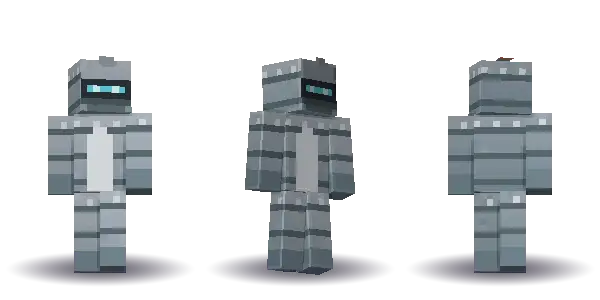
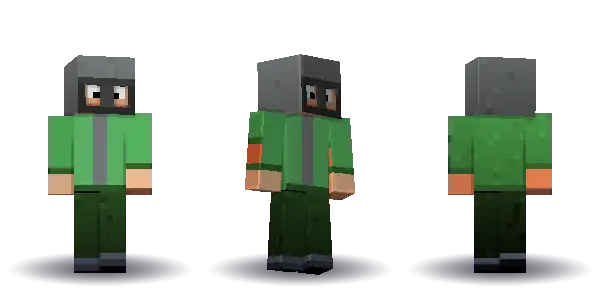
Green cyber jacket with a visor helmet. A free Minecraft skin from “a green cyber jacket with a visor helmet”, painted by Blocksmith as a 64×64 PNG for.
Drag to turn. Front and Back snap the view. Drawn from Blocksmith's own 64 by 64 skin, not a Mojang texture.
- Hair short
- Face visor
- Top jacket
- Legs trousers
- Extra helmet
Get this skin
“a green cyber jacket with a visor helmet” is one the offline reader already knows. It runs on your computer. Players 13 and over need a verified email. New accounts start with 3 AI wishes. Plus is for a sentence outside that list. Players under 13 do not sign in.
Mac and Windows. On a phone, we email the link to your computer.
What you typed
a green cyber jacket with a visor helmet
Hair is short, the face is visor, the top is jacket and the legs are trousers. Extras: helmet. The top colour is #4a9d4f.
Hair short, face visor, top jacket, legs trousers. Extras: helmet.
| Name | Green Cyber Jacket |
|---|---|
| Seed | 1327329485 |
| trim | #737777 |
| hair | #43302a |
| skin | #e6b48c |
| top | #4a9d4f |
| bottom | #1e3617 |
| accent | #070b04 |
How to use this skin in Minecraft
How to add Green cyber jacket with a visor helmet in Minecraft is the same path as any 64×64 file Blocksmith paints: sentence, PNG, then Java or Bedrock.
- Type the sentence. In Blocksmith, type “a green cyber jacket with a visor helmet”. The offline reader paints this skin on your computer, so it does not spend an AI wish.
- Look at the parts. Hair is short, the face is visor, the top is jacket and the legs are trousers. Extras: helmet. The file is a 64 by 64 PNG, which is the sheet Minecraft: Java Edition and Bedrock both import.
- Put it on a character. On Java, use the app’s button or the launcher’s skin picker and choose the PNG. On Bedrock, open the dressing room, edit the character, and import that same PNG.
Free Minecraft skins · How to add a custom skin.
Questions
Can I use Green cyber jacket with a visor helmet on Bedrock?
Yes. It is a standard 64×64 PNG. Import it from the dressing room on Minecraft for Windows. The same file is a Java skin. Blocksmith does not make 128×128 skins.
What sentence painted Green cyber jacket with a visor helmet?
“a green cyber jacket with a visor helmet”. The seed is 1327329485, so the same words paint the same skin offline.
Is Green cyber jacket with a visor helmet an official Minecraft skin?
No. Blocksmith drew the pixels. It is not a Marketplace skin, and it is not a character from a show.