 BLOCKSMITH
Home · Gallery · Silver knight with a red cape
Silver knight with a red cape
Made in Blocksmith from “a knight in silver armour with a red cape”.
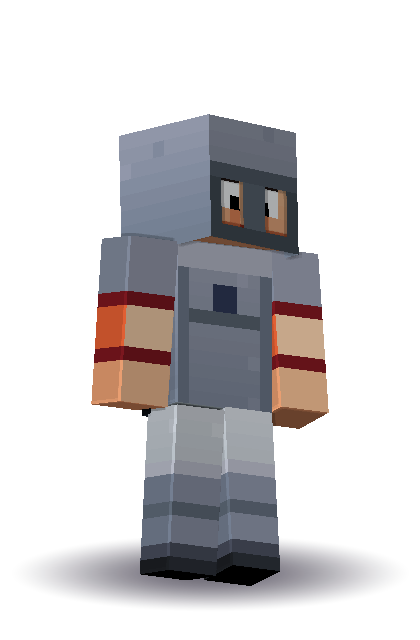
This knight was made from the sentence “a knight in silver armour with a red cape”, read by Blocksmith’s offline list rather than by the AI. The metal is a cool grey with a lighter edge along the shoulder and a darker hem, the cape is a red overlay on the back and the sides, and the face is the brave one from the skin’s own set of faces. Nothing here was traced from a Marketplace skin or from a character in the game.
The sheet underneath the picture is the ordinary 64 by 64 layout: head, body, arms and legs, plus the second layer for the cape and the armour trim. Java Edition takes that file from the skins folder. The same PNG imports on Minecraft for Windows through the dressing room, which is the Bedrock path Blocksmith writes when you press Bedrock skin. The outer layer is in the file, so the cape is not painted onto the torso and then forgotten.
What I would change next, still without spending a wish, is the cape colour and the helmet. The controls in the app remake the same character from the same recipe. The silver stays silver unless you move the metal swatch. That is the useful part of an offline skin: the sentence picked a starting point, and the sliders are the edit.
| Wish | a knight in silver armour with a red cape |
|---|---|
| Name it used | Knight in Silver Armour |
| Seed | 357185058 |
| Skin sheet | [64, 64] |
| Colours | trim #858c9d, hair #43302a, skin #e6b48c, accent #2b3550 |
The same kind of thing, on your computer: how this feature works. Other outputs are in the gallery.